RED_SIM
patreon
Universal Eye Shader, is a serious instrument for making nice looking stylized Eyes.
You can make pretty much anything you want with it: volumetric insides, any patterns, parallax-based flares, reflections, just almost anything you can imagine.
This is the first and one of my best-quality asset for my Tier IV patrons. You can download it here:
>>> DOWNLOAD UNIVERSAL EYE SHADER V.1.1.0 <<<
You can also check it in VRChat here first:
>>> TEST THIS ASSET IN VRCHAT HERE <<<
More information and usage documentation below
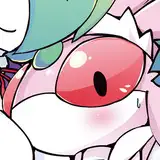
This demon-eye demonstrates the ability to change pupil proportions and a flame-like effect:

You can use layers to simulate the real iris pattern:

With a few layers of star textures you can make this volumetric effect:

Scrolling ahegao? Easy!

Really stylish flame you can make of different noise textures:

This one is my favorite! Few layers of colored reflection textures can give you this shiny colored effect:

Just use your imagination and make anything you want!

To make this shader work correct, your eye MUST be flat.

If your eyes are flat, but still not work correct, try to recalculate their normals, it might help.
Also be sure that there are no blend shapes controls your eyes shape or your eyes normals.
Currently available shader properties (v.1.0.0):

Now, since this release, the new shader GUI will be included in each of my shader assets.

It will automatically show you if it is a new version of the asset available.
Also, now, if you're my supporter (at least Tier III) your nickname will be shown at the bottom of the shader UI. Tier IV patrons are marked with the red color.
(This list updates through the internet soon after you become my patron)

Since you been my Patreon Tier IV supporter at least once, you can use this asset on any of your avatars. You are allowed to make public avatars with this shader. You are NOT allowed to share or resell this asset to anyone. You can modify the asset for yourself but still not able to share or resell the modified version!
If you are an Avatar creator who makes commissions, you are able to use this asset for avatars, but NOT to share it with the client. You can only upload the avatar to VRChat with my shader included, but NOT to share or resell the sources.
You can provide him the avatar sources without my shader included, and then ask him to subscribe to my Patreon Tier IV at least once to download the required asset.
Thanks for your understanding!

Hey I just subed again to get that shader, hope you are doing well, your work is very useful!