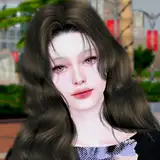
Nightraven | A Reshade Preset (Download)
🕑 Added 2023-11-04 18:24:29 +0000 UTC
You guys been asking for my personal reshade preset for a long while now. Even though this is not the exact same reshade preset, it's pretty close to what i use. And i actually added some more cool effects in it. This reshade preset is really really light and it's completely gameplay friendly.
What do you need for this to work?
/!\ These are the things you need to download. But not all of them goes directly to your mods folder. Please read the details before you download/install them.
- ReShade 4.9.1 (If you prefer to use an older version, you still need to downlaod shaders below) (Also, this step by step guide can be helpful if you want to revert from gshade to reshade. If you have gshade atm or you already deleted gshade and will install reshade freshly, ignore this guide)
- Required Shaders & Textures (As i don't know what shaders & textures are essential, i uploaded them too - This will go to: PC > Sims' Installed Drive > Origin or EAGames (depending on the app you're using) > The Sims 4 > Game > Bin (paste it there after you install reshade first. After that, paste it and say yes and overwrite existing ones) - Download from the attachments at the bottom)
- "Nightraven" reshade preset (Download from the attachments at the bottom)
- NoBlu By Luumia (I use V2 Darkest but it's your choice, atleast 1 of them is recommended) (Check this guide)
- NoGlo v2 By Luumia (Check this guide)
- (OPTIONAL) K-Project by Tech-Hippie (I linked the post for installation guide made by me. You can also see how to install NoBlu and NoGlo)
- (MUST HAVE) Sunblind by Softerhaze (See this step by step guide for how to intall this, pretty simple). This is free to download. When you press "download", it asks you if you want to donate to creator. If you click "No thanks, just take me to the downloads", it will take you straight to download for free.
- (OPTIONAL But highly recommended) Moriel's plant and tree replacement
How to install Reshade? Well, there are tons of guide on youtube to how to install Reshade so i'm skipping this part. It's fairly easy to install if you are familiar with Gshade or Reshade.
-
Some notes:
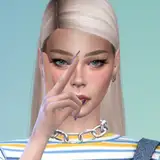
- This preset is fun to use. However, remember that the look of your game might differ from in game time to time, the weather and the world you are in. But the main idea of how the preset looks can be seen on the photos part of this post (above).
- Even though this preset is very, very light, some might still struggle with the frame rate due to insufficient system specifics. If you are having lags, try to turn off MXAO shaders from the reshade menu.
- If you have issues with MXAO (Shadows): MXAO can be problematic if your settings are not set properly. If the MXAO shadows causing extreme darkness on the world/objects/sims, it means your mxao settings are causing a problem. For this issue, there's a 3 click solution. You need to do this just 1 time and you'll be good. First, you'll see a shader list on the window above when you open reshade menu (ingame). And then, you'll see the second window right below the shader list. You'll see a bar named "Global Preprocessor Settings". Click to it. Second, after you click to that bar, find the "reshade_depth_input_is_reversed" line. Third, if it's 1, delete 1 and type 0 and then, hit enter and click to "reload" button at the very bottom of the Reshade menu. All done! If it's already 0, it probably means you might've installed reshade or it's textures/shaders wrong. You may want to re-install it.
-
Even though my knowledge is limited on the reshade software, i'll try to help out if you have any questions :)
Hope you have fun! ♥